Latest Post

Remove Templateism Credit Link

For bloggers who use template-is issues you may have noticed that some songs are very beautiful , very well optimized , with an impressive load speed , a design smart enough etc etc etc etc

HERE YOU CAN SEE IN OUR TEMPLATE... WE REMOVED IT... 

But for those fussy seo there's a catch , you can not remove footer links from template-is templates , as these links are edited , the blog, after a few seconds makes a redirect to the homepage of the author of the blogger skin
http://RemoveCreditLink.blogspot.com/

This for many webmasters who use these templates , a problem facing a penalty from google

I 'm using one of those templates in one of my blogs, but obviously do not like having links in the footer , in fact I do not like having many outbound links , but I came out with this template challenge ( hehe ) search template and I realized that the bottom line was the part that has java script :

 Einstein said it best intelligence but I do not need tools to do things, or something said , I do not remember , but hey the point is that the first idea that occurred to me was to spend that code for Hex Decoder unfortunately does not work , for which the template is broken , look at other blogs and mentioned along about id = ' myCONTENT '> to replacing it , that deleting it etc etc etc , none of that worked

Well if you have a template of template-is and want to change / remove the footer links , let's get down !

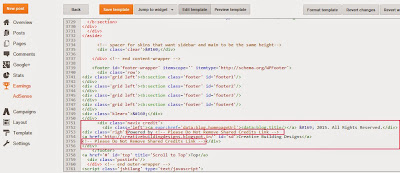
Log into your blog template >>> >>>> edit html and removes all this code:

http://grandtheftbay.tk/

Make sure to remove from <script type='text/javascript'> and to </script>

If you Couldn't  find the code in the image, it means the code is hided in javascript find this code and remove it your done here :: <script src='https://btemplateism.googlecode.com/files/blogger_pagenavi_min.js' type='text/javascript'/>

and delete the Script below this script that now i entered here...!


<script type='text/javascript'>
var Template-isSummary = {
    displayimages: true,
    imagePosition: &#39;left&#39;,
    Widthimg: 420,
    Heightimg: 200,
    noThumb: &#39;https://blogger.googleusercontent.com/img/b/R29vZ2xl/AVvXsEgQVNIkmVOaoMKwTIi3KKPGrt26qYWpQYUIzGgUoXeXT7ptDRlsAsMoK9mKUeZHxMGZX_n2PZgzlz_BZyfltBpilpBdmHtMwVyI9NlWdYjFhvwxpLQcOJlcpLXgRNDE-2b7556fXMwcdAM/s1600/no-thumb.jpg&#39;,
    SummaryWords: 60,
    wordsNoImg: 60,
    skipper: 0,
    DisplayHome: true,
    DisplayLabel: true
};
</script>

From Here To :: 
//<![CDATA[

//]]> ::Here 

and don't delete the next script k.

 Then
 Save it Enjoy::


IF
STEP :1

Step:1 Go to blog Dashboard>Template>Edit HTML.

Step:2 Search the code
//<![CDATA[

Step:3 There are many such codes.Find one which looks like this
(please see picture as shown in blog )
Step:4 Select the code just bellow
  //<![CDATA[ to //]]> as shown in picture

Step:5 Now delete the selected code and replace the following script

<script type='text/javascript'>
var Template-isSummary = {
    displayimages: true,
    imagePosition: &#39;left&#39;,
    Widthimg: 420,
    Heightimg: 200,
    noThumb: &#39;https://blogger.googleusercontent.com/img/b/R29vZ2xl/AVvXsEgQVNIkmVOaoMKwTIi3KKPGrt26qYWpQYUIzGgUoXeXT7ptDRlsAsMoK9mKUeZHxMGZX_n2PZgzlz_BZyfltBpilpBdmHtMwVyI9NlWdYjFhvwxpLQcOJlcpLXgRNDE-2b7556fXMwcdAM/s1600/no-thumb.jpg&#39;,
    SummaryWords: 60,
    wordsNoImg: 60,
    skipper: 0,
    DisplayHome: true,
    DisplayLabel: true
};
</script>

Step 2:
<div id='copyright'>
<p>Copyright &#169; 2013 Remove Credit Link. Designed by <a
href='http://www.facebook.com/https://www.facebook.com/pages/Remove-Credit-Link/187485321447761 id='mycontent'>Remove Credit Link
Magar</a></p>
                        </div><!--copyright-->
                </div><!--footer-bottom-->

</div><!--footer-bottom-->

Step:6 Search the word mycontent and change it with any word you may
like such as Remove Credit Link
Step:7 Now change or remove credit link as you desired.
Step:8 Save the template.

Many websites like  SoraTemplates, ThemeXpose, etc. are available on the Internet which 
provides nice blogger template at very low cost. If you purchase their template. that template
 will not contain any credit link. These websites also provides most of the free blogger 
template with Non-removable credit link. If you'll try to remove credit link from their template, 
Your blog will automatically redirect to their website (Homepage or a particular templet 
designer site). This is because they added some JavaScript into their free templates. In other
 hand, if you undo the changes and keep their original credit of template then it works 
perfectly.
Premium Blogger Templates

How to Remove Credit Link?


Actually, these links are attached with some JavaScript or CSS. Finding JavaScript from the 

template and then removing is time consuming it requires lot's of effort to do this. But in other

 hand, you can easily hide the credit/footer link via CSS. This method is very simple and takes only 2 minutes.


1. Remove Credit/Footer Link:
  • First of all go to Blogger.com
  • Just Login to your Blogger Profile and select your blog.
  • Now go to Dashboard > Template > Edit HTML.
Premium Blogger Templates
  • Go to the footer and find the credit/footer link which needs to remove/hide. You'll find 
  • something like Copyright, credit or designed etc (Like picture shown below).
Premium Blogger Templates
  • Add the following line with your original copyright ID. (As shown in picture below).
style="visibility: hidden"
 Premium Blogger Templates
  • Save your Template
Remove Footer Credit Links From Premium Blogger Templates


1. What is Metadata?
Metadata is termed as “Data about content of the data” and it is found in the catalog of libraries. Practically, it is used at back side of book to see the necessary topic.

2. What is the difference between VB and VB.Net?
Following are the differences between VB and VB.Net:
VB
VB.Net
Platform dependent
Platform Independent
VB is backward compatible
VB.Net is not backward compatible
Interpreted
Compiler Language
Exception Handling by ‘On Error…..Goto’
Exception Handling by ‘Try….Catch’
Cannot develop multi-threaded applications
Can develop multi thread applications

3. What is the difference between C# and VB.Net?
    Following table gives differences between C# and VB.Net:
VB.Net
C#
Optional Parameters are accepted
Optional Parameters are not accepted
Not case sensitive
Case Sensitive
Nothing is used to release unmanaged resources
‘Using’ is used to release unmanaged resources
Support of Both structured and unstructured error handling
Unstructured error handling

4. What is namespace?
    A namespace is an organized way of representing Class, Structures and interfaces present in .NET language. Namespaces are hierarchically structured index of a class library, available to all .NET Languages. 
              
5. Which namespace are used for accessing the data? 
System.Data namespace is used for accessing and managing data from the required data source. This namespace deals only with the data from the specified database. 

6. What is JIT?
    JIT is termed as Just in Time compiler which is used as a part of runtime execution environment. There are three types of JIT and they are:
  • Pre-JIT – Compiles at the time of deployment of an application
  • Econo-JIT – Compiles called methods at runtime
  • Normal JIT – Compiles called methods at runtime and they get compiled first time when called 

7. What is an assembly and its use?
    An assembly is one of the elements of a .NET application and it termed as a primary unit of all .NET applications. This assembly can be either DLL or executable file.

8. What is strong name in .NET assembly?
Strong Name is an important feature of .Net and it is used to identify shared assembly uniquely. Strong name has solved the problem of creating different object with same name and it can be assigned with the help of Sn.exe.

9. What are the different types of assembly?
There are two types of assembly –
  • Private – A private assembly is normally used by a single application and it is stored in application’s directory.
  • Public – A public assembly or shared assembly is stored in Global Assembly Cache(GAC) which can be shared by many applications 
10. What is the difference between Namespace and Assembly?
Assembly is physical grouping of all units and Namespace logically groups classes. Namespace can have multiple assemblies.

11. What is INTERNAL keyword in .Net Framework?
INTERNAL keyword is one of the access specifier which will be visible in a given assembly i.e. in a DLL file. This forms a single binary component and it is visible throughout the assembly. 

12. What are Option Strict and Option Explicit?
.Net generally allows implicit conversion of any data types. In order to avoid data loss during data type conversion, Option Strict keyword is used and it ensures compile time notification of these types of conversions.
Option Explicit is the keyword used in a file to explicitly declare all variables using declare keywords like Dim, Private, Public or Protected. If undeclared variable name persists, an error occurs at compile time.

13. What is the use of New Keyword?
New keyword is used with the constructor in which it can be used as a modifier or an operator. When it is used as a modifier, it hides inherited member from the base class member. When it is used as an operator, it creates an object to invoke constructors.

14. What is ReDim keyword and its use? 
Redim keyword is exclusively used for arrays and it is used to change the size of one or more dimensions of an array that has been already declared. Redim can free up or add elements to an array whenever required.


15. What is jagged array in VB.Net?
             Jagged array is nothing but an array of arrays. Each entry in the array is another array that can hold any number of items.

16. What is Manifest?
A Manifest is a text file that is used to store metadata information of .NET assemblies. File type of Manifest can be saved as a type PE. Assembly Name, Version, Culture and key token can be saved as a Manifest.

17. What are all the differences between Dispose and Finalize()?
Finalize method is called by Garbage collector which helps us to make free of unmanaged resources. There are some other resources like window handles, database connections are handled by iDisposable interface.
Dispose method is handled by IDisposable interface to explicitly release unused resources. Dsipose can be called even if other references to the object are alive.

18. What is Garbage Collection?
Garbage collection is also known as automatic memory management, which is used for automatic recycling of dynamically allocated memory. Garbage collection is performed by Garbage collector which will recycle memory if it is proven that memory will be unused.

19. What are the types of generations in garbage collector?
There are three types of generations in garbage collector.
Generation 0 – This identifies a newly created object that has been never marked for collection.
Generation 1 – This identifies an object which has been marked as collection but not removed.
Generation 2 – This identifies an object that has survived more than one sweep of the Garbage collector.

20. What is the use of Option explicit?
Variable must be compulsorily declared when the Option Explicit is termed as ON. If it is OFF, variables can be used without declaration.

21. What is the difference between System.String and System.StringBuilder classes?
System.string class is non-updatable and it will create new string object instead of updating the same. But updation in the same string object is possible for String. Stringbuilder class. So, the operation on string builder is faster and efficient than the string class.

22. What is the difference between int and int32?
Int32 represent 32-bit signed integer whereas int is not a keyword used in VB.Net. 

23. What is hashtable?
Hashtable is set to be items with key and value pairs. Keys are referred as indexes and quick search can be performed for values by searching through the keys.

24. What are nested classes?
A class that can be declared within the scope of another class. These classes are considered within the scope of the enclosed class and are available within that class or scope.

25. What is Enumerator?
An Enumerator or Enum is a value type with a set of constants given to the set of the list. Enumeration is used when definition is required for more than one number.

26. What is Delegate?
A delegate is defined as an object that can refer to a method. Whenever a delegate is assigned to a method, it behaves exactly like that method.

27. What is Globalization?
 
Globalization is nothing but making the application  Internationalize and localizing the application to other languages or cultures. Culture is nothing but a combination of Language(English) and the location like US or UK.

28. What is the difference between Dataset and Datareader?

DataReader
Dataset
Datareader has read only access to the data and it is set to be forward only.
Dataset can hold more than one table from the same data source. It even stores relationships between tables.
Datareader cannot persist contents as it is read only
Dataset can persist contents
Datareader is connected architecture
Dataset is disconnected architecture

 29. What is the difference between value and reference types?
Value types directly store the data and it is allocated to stack. Reference type store a reference to the value’s memory address and are allocated to heap.

30. What is TRACE in VB.Net?
TRACE allows the user to view how the code has been executed in detail. This tells how the code is working.

31. What is Authentication and Authorization?
Authentication is the process of obtaining credentials from the users and verifying the user’s identity. Authorization is the process of giving access to the authenticated resources. Authentication leads to Authorization.

32. What are the types of Authentication?
There are three types of Authentication and they are –
  • Windows Authentication
  • Forms Authentication
  • Passport Authentication
33. What is Global Assembly Cache (GAC)?
GAC is used where shared .NET assembly resides. It is used in the following criteria:
  • If .Net assembly has special security requirements
  • If .Net application has to be shared with other applications
34. What is CLR?
    CLR is abbreviated as Common Language Runtime and it forms heart of the .NET framework. It is the responsibility of runtime to take care of the code execution of the program. CLR takes care of the following:
  • Garbage Collection
  • Code Verification
  • Code Access Security
  • IL (Intermediate Language)
35. What is CTS?
CTS is Common Type System which is used to communicate smoothly between the languages. For example, if VB has Integer data type and C++ has long data type and these data types are not compatible.
In order to be compatible, CTS can be used as an interface between two languages.

36. What is CLS?
Common Language Specification is a subset of CTS and it is used to unite all languages in to one umbrella. This extends to support all the .NET language into one unit.

37. What is Managed code?
Managed Code is used to run inside the CLR environment and it is called as .NET run time. All Intermediate Language (IL) are set to be Managed code.

38. What is serialization in .Net?
Serialization is defined as a process of converting an object to stream of bytes. This is used mainly to transport objects.

39. How many languages are supported by .Net?
Following are the languages supported by VB.Net:
  • C#
  • VB.Net
  • COBOL
  • Perl
40. What is the difference between Convert.tostring and i.tostring method?
Convert.tostring handles Null and i.tostring does not handle null.

41. What are the two main parts of .NET?
They are – Common Language Runtime (CLR) and .NET Framework class library.

42. What is the difference between thread and process?
Thread is used to execute more than one program at a time.  Whereas, Process executes single program at a time.

43. What is strong typing and weak typing?
Strong type is checking the types of variables at compile time and weak type is checking the types of system as late as possible which is nothing but run time.

44. How many .NET languages can a single .NET DLL contain?
Only one language will be supported by one DLL.

45. What is the class that allows an element to be accessed using Unique key?
Hash table is the collection class that allows an element to be accessed using Unique key.

46. What is Code Security?
.NET framework provides security features to secure code from unauthorized users. There are two types of security in .NET:
  • Role based security – Authorizes User
  • Code access security – Protects system resources from unauthorized calls
47. Which DLL Is used for Microsoft .NET run time?
Mscoree.dll is used for Microsoft .NET runtime DLL.

48. How many classes a DLL can contain?
Unlimited number of classes can be present in a DLL.

49. How can we store decimal data in .NET?
BinaryWriter is used to store decimal data in .NET.

50. What is deep copy?
Deep copy is nothing but creating a new object and then copying the non-static fields of the current object to new object. 


Windows 10 Lifetime Activator : KMSPico official latest beta
KMSPico is the most successful, frequently updated and 100% clean tool to permanently activate any version of Windows and Microsoft office within matter of seconds.Activator does not require user intervention, the entire activation process takes place in the background, just run the activator and a couple of minutes to check the activation status of Windows and/or Office.
Don’t have Windows 10 Final ISO ? Get it know 
Requirements
.NET 4.0 or Windows 8/2012.
Can Activate
  • Windows Vista Bussines/Enterprise
  • Windows 7 Professional/Enterprise
  • Windows 8
  • Windows 8.1
  • Windows 10 Preview/Final Official
  • Office 2010/2013
  • Windows Server 2008/2008R2
  • Windows Server 2012/2012R2
How to activate ?
  1. Download and extract rar file
  2. Run KMSpico_setup.exe
  3. Install it. (Or Use portable version to skip installing just run Autopico)
  4. Press the Red Button.
  5. Done.
Screenshots
kmspicowin10scn1
Downloads
Links

Microsoft Office 2016
Microsoft Office 2016 well demonstrates how today has changed the approach to create documents and work with them. Many of us are beginning to work on the same computer, it continues on the other, as demonstrated in the third, simultaneously managing to make minor changes for laptop, tablet or smartphone. Therefore, Office 2016 tried to make conceptually different. Almost all of the key elements in it have been developed from scratch, and applications oriented to a single style of work, regardless of the hardware platform. They are designed to provide the usual functional on any device, automatically adjusting its interface to the parameters of the current screen and the available system resources.
What’s New ?
  • Already available in OneNote and Window, math input control is now available in Word, Excel and PowerPoint. You can write math equations with a digital pen, a pointing device, or even your finger, and have the ink converted to a “typed” format.
  • This feature simplifies resolving conflicts when coauthoring. You can choose between two versions of the conflicting slides, your changes or others’ changes, instead of sifting through the individual conflicts.
  • This feature increases the number of default shape styles by introducing new “preset” styles in Word, Excel, and PowerPoint.
  • We’ve improved the timeline view in Microsoft Project so you can now have multiple timeline bars in a single view and you can set the date range for timeline bars so they can just represent a specific phase of your project. To try this out, click on the timeline and then go to the Format tab. Note the new Date Rage and Insert Timeline Bar commands.
  • Visio diagramming can be intimidating for someone who is new to Visio and not used to the rich set of tools offered. The Getting Started experience now makes the Visio canvas more inviting by providing a select set of pre-crafted starter diagrams which will help the users in some of the very core scenarios for that template. In addition, there are some tips provided with the diagram which help the users in editing and completing their diagram creation experience. Using Visio is easier than ever.
  • The preview has higher DPI support for 250% and 300% so that your Office documents look great on larger screens.
  • No more waiting while large charts and SmartArt diagrams load as the text will appear right away, allowing you to dive right in and start editing. A placeholder for the chart or SmartArt will be displayed until the object fully renders but you can still interact with the document.
  • We’ve changed the default Office theme to align with the visuals of our modern apps. The default theme is now “Colorful” (previously, the default theme was “White”). You can always change your theme by going to File > Account > Office Theme.
  • Now, with automatic image rotation, once you insert an image into the apps, it automatically rotates the picture to match the camera’s orientation. You can manually rotate the image to any position after insertion. Note that this only affects newly inserted images and does not apply to pictures in existing documents.
  • The Building Plan and Electrical stencils have been refreshed with new shapes so you have more variety to choose from.
  • Open up an Excel workbook within SharePoint quickly in read-only mode to quickly get to what matters most.
  • This new theme is designed to provide users with visual impairments who find overly bright displays unusable in Office 2013, with a more visually subtle background to work with in the apps. Dark theme also includes improvements to Word’s navigation pane (better readability, fixed white flashes) and several Outlook readability fixes (white text on light background, dark text on dark background, disabled text being unreadable). The contextual ribbon tab text, hover states and task pane controls have also been improved.
  • New chart types
  • Quick data linking in Visio
  • And Many More
How To Install ?
  1. Download and Extract The ZIP File From The Links Given Below
  2. Open Setup.exe
  3. Remove Office 2016 using the “Force Remove Office 2016″ and restart the computer.  (IF INSTALLED)
  4. To Install OFFICE, Click “INSTALL OFFICE”
  5. Start KMSAuto Lite TEST4 and click “Activate Office”. The program should be
    to check the “customize Office RETAIL => VL”
  6. Done, Enjoy :)
Screenshot
Direct Download Link
Downloads

Crack/Medicine Download


Windows 10 official logo
Windows 10
After weeks of apparent deliberation over the name and months of screenshots, Microsoft has just taken the wraps off Windows 10, and below, we’ve all the key details as revealed by the software company.
Given that the two versions preceding Windows 10 were Windows 7 and Windows 8 – Windows 8.1 scarcely constitutes a major release, it was strongly suspected that the build codenamed Threshold would evolve into Windows 9. However, with suggestions floating around including “Windows X” and “Windows One,” the software maker has settled on Windows 10.
But aside from the name, what does Windows 10 include in terms of features? Here, we dissect the announcement, and check out what’s in store.
Download Now !!
Direct Download Link
Screenshots
Features

A Truly Unified Store For Apps

With Windows 10 and beyond, Microsoft will allow consumers to source content for all devices running its software from one central point. No longer will there be a different store for Xbox, Windows Phone and Windows, but looking ahead, apps, music, video and other such effects will be plucked from the same portal.

Enterprise

Microsoft has long since sought to cater to business and enterprise markets with Windows, and as you’d expect, there’s big emphasis once again with Windows 10. With features including corporate data protection, and what the company refers to as “modern management,” business users will continue to thrive on what Microsoft is already dubbing as “the best enterprise platform ever.”

Start Menu

111
Hauled with very little remorse with the introduction of Windows 8, the removal of the long-standing Start menu left many users with a feeling of bemusement, but as promised, the traditional Start menu is back.
Windows 10 1
It mixes elements of old and new, animating like it did on Windows 7 but sporting remnants of that Metro / Modern interface, and not only does this seem like a happy median, but Start menu tiles can also be resized.

Continuum Mode

Start1
If you boast a two-in-one PC then you’ll be presented with a brand new Start Screen. And under-the-hood, Windows 10 will detect which sort of hardware you’re running and it will adjust the user-interface to fit your needs.

Enhanced Search

Windows 10 search
Continuing on the topic of the Start menu, search has also been enhanced with Windows 10. Users will be able to key in their search queries directly from Start, and can perform both local and Web searches using this particular facility.

Desktop Optimizations

Windows 10 app snap
Microsoft was panned by critics for going on head-first with its big Metro / Modern ideas for Windows 8 without considering that the vast majority of its user base used – and still do use – traditional rigs bereft of the touch-screen.
Windows 8.1 pandered to desktop users considerably with many of the changes that it brought, and with Windows 10, this trend continues. Windowed Metro / Modern apps should play nicer with the keyboard and mouse arrangement, and for the most part, PC and notebook users should feel a great deal more comfortable with Windows 10 than they did back in 2012 with Windows 8.

Multitasking

Multitasking continues to be an integral aspect as we seek to perform numerous tasks concurrently, and with Windows 10, Microsoft has added a couple of new features to make multitasking even simpler and more fluid.
444
The new ‘Task View’ button, for example, which is located on the task bar, throws up an Exposé-like view of all of your apps, and even though Windows 10 is still very much in development, productive users will certainly enjoy some of the tweaks that have been made here.

Enhanced Snap View

333
The all-new Snap Assist UI allows “up to four apps to be snapped on the same screen,” as per Microsoft’s official press release, and with a neat, smart suggestions feature that’ll indicate which open apps you should fill up empty desk space with, it’s a very intuitive all-round feature.

Multiple Desktops

555
Windows users have long since bombarded themselves with an overloaded desktop, with files and apps accumulating into one big hullabaloo. With Windows 10, users will be able to create multiple / virtual desktops, allowing productive, organized folk to arrange separate desktops for different tasks, while those messy folk can make a real mess over several plains rather than just the one.

Windows For All Devices

ByzJKfZIUAE3gdh
The next version of Windows is tailor-made to work on all devices, be it a 4-inch phone, all the way up to a mighty 80-inch display.
Technical Preview Download
The Technical Preview of Windows 10, which has been referenced ad nauseam over the last couple of months, will be available for users to test starting October 1st, 2014. The all-new Windows Insider Program will, a bit like Apple’s new OS X Beta Seed program, allow regular users to test drive unfinished software should they so wish, although as exciting as it sounds, interested parties should remember that the experience is likely to be buggier and more erratic than usual.
More details can be found at: preview.windows.com
Release Date
Microsoft revealed that Windows 10 will roll out in the middle of next year, and although naturally vague at this stage, did also add that it would be releasing after the annual BUILD dev gathering.
Pricing
There’s no word on the price as yet, which makes sense given that we’re barely over the line for the announcement, but as soon as this information is made public, we’ll have the details right here
Download Links

Crack/Medicine Download


MKRdezign

Contact Form

Name

Email *

Message *

Powered by Blogger.
Javascript DisablePlease Enable Javascript To See All Widget