Remove Credit Link From Blogger Template
Remove Templateism Credit Link
For bloggers who use template-is issues you may have noticed that some songs are very beautiful , very well optimized , with an impressive load speed , a design smart enough etc etc etc etc
HERE YOU CAN SEE IN OUR TEMPLATE... WE REMOVED IT...
But for those fussy seo there's a catch , you can not remove footer links from template-is templates , as these links are edited , the blog, after a few seconds makes a redirect to the homepage of the author of the blogger skin

This for many webmasters who use these templates , a problem facing a penalty from google
I 'm using one of those templates in one of my blogs, but obviously do not like having links in the footer , in fact I do not like having many outbound links , but I came out with this template challenge ( hehe ) search template and I realized that the bottom line was the part that has java script :
Einstein said it best intelligence but I do not need tools to do things, or something said , I do not remember , but hey the point is that the first idea that occurred to me was to spend that code for Hex Decoder unfortunately does not work , for which the template is broken , look at other blogs and mentioned along about id = ' myCONTENT '> to replacing it , that deleting it etc etc etc , none of that worked
Well if you have a template of template-is and want to change / remove the footer links , let's get down !
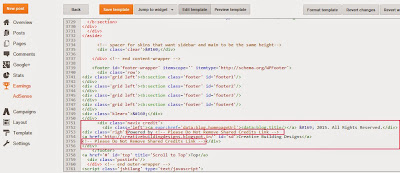
Log into your blog template >>> >>>> edit html and removes all this code:

Make sure to remove from <script type='text/javascript'> and to </script>
If you Couldn't find the code in the image, it means the code is hided in javascript find this code and remove it your done here :: <script src='https://btemplateism.googlecode.com/files/blogger_pagenavi_min.js' type='text/javascript'/>
and delete the Script below this script that now i entered here...!
From Here To ::
//<![CDATA[
//]]> ::Here
and don't delete the next script k.
Then Save it Enjoy::
IF
STEP :1
Step 2:
<div id='copyright'>
<p>Copyright © 2013 Remove Credit Link. Designed by <a
href='http://www.facebook.com/https://www.facebook.com/pages/Remove-Credit-Link/187485321447761 id='mycontent'>Remove Credit Link
Magar</a></p>
</div><!--copyright-->
</div><!--footer-bottom-->
</div><!--footer-bottom-->
Step:6 Search the word mycontent and change it with any word you may
like such as Remove Credit Link
Step:7 Now change or remove credit link as you desired.
Step:8 Save the template.
HERE YOU CAN SEE IN OUR TEMPLATE... WE REMOVED IT...
But for those fussy seo there's a catch , you can not remove footer links from template-is templates , as these links are edited , the blog, after a few seconds makes a redirect to the homepage of the author of the blogger skin

This for many webmasters who use these templates , a problem facing a penalty from google
I 'm using one of those templates in one of my blogs, but obviously do not like having links in the footer , in fact I do not like having many outbound links , but I came out with this template challenge ( hehe ) search template and I realized that the bottom line was the part that has java script :
Einstein said it best intelligence but I do not need tools to do things, or something said , I do not remember , but hey the point is that the first idea that occurred to me was to spend that code for Hex Decoder unfortunately does not work , for which the template is broken , look at other blogs and mentioned along about id = ' myCONTENT '> to replacing it , that deleting it etc etc etc , none of that worked
Well if you have a template of template-is and want to change / remove the footer links , let's get down !
Log into your blog template >>> >>>> edit html and removes all this code:

Make sure to remove from <script type='text/javascript'> and to </script>
If you Couldn't find the code in the image, it means the code is hided in javascript find this code and remove it your done here :: <script src='https://btemplateism.googlecode.com/files/blogger_pagenavi_min.js' type='text/javascript'/>
and delete the Script below this script that now i entered here...!
<script type='text/javascript'>
var Template-isSummary = {
displayimages: true,
imagePosition: 'left',
Widthimg: 420,
Heightimg: 200,
noThumb: 'https://blogger.googleusercontent.com/img/b/R29vZ2xl/AVvXsEgQVNIkmVOaoMKwTIi3KKPGrt26qYWpQYUIzGgUoXeXT7ptDRlsAsMoK9mKUeZHxMGZX_n2PZgzlz_BZyfltBpilpBdmHtMwVyI9NlWdYjFhvwxpLQcOJlcpLXgRNDE-2b7556fXMwcdAM/s1600/no-thumb.jpg',
SummaryWords: 60,
wordsNoImg: 60,
skipper: 0,
DisplayHome: true,
DisplayLabel: true
};
</script>
From Here To ::
//<![CDATA[
//]]> ::Here
and don't delete the next script k.
Then Save it Enjoy::
IF
STEP :1
Step:1 Go to blog Dashboard>Template>Edit HTML.
Step:2 Search the code
//<![CDATA[
Step:3 There are many such codes.Find one which looks like this
(please see picture as shown in blog )Step:2 Search the code
//<![CDATA[
Step:3 There are many such codes.Find one which looks like this
Step:4 Select the code just bellow
//<![CDATA[ to //]]> as shown in picture
Step:5 Now delete the selected code and replace the following script
<script type='text/javascript'>
var Template-isSummary = {
displayimages: true,
imagePosition: 'left',
Widthimg: 420,
Heightimg: 200,
noThumb: 'https://blogger.googleusercontent.com/img/b/R29vZ2xl/AVvXsEgQVNIkmVOaoMKwTIi3KKPGrt26qYWpQYUIzGgUoXeXT7ptDRlsAsMoK9mKUeZHxMGZX_n2PZgzlz_BZyfltBpilpBdmHtMwVyI9NlWdYjFhvwxpLQcOJlcpLXgRNDE-2b7556fXMwcdAM/s1600/no-thumb.jpg',
SummaryWords: 60,
wordsNoImg: 60,
skipper: 0,
DisplayHome: true,
DisplayLabel: true
};
</script>//<![CDATA[ to //]]> as shown in picture
Step:5 Now delete the selected code and replace the following script
<script type='text/javascript'>
var Template-isSummary = {
displayimages: true,
imagePosition: 'left',
Widthimg: 420,
Heightimg: 200,
noThumb: 'https://blogger.googleusercontent.com/img/b/R29vZ2xl/AVvXsEgQVNIkmVOaoMKwTIi3KKPGrt26qYWpQYUIzGgUoXeXT7ptDRlsAsMoK9mKUeZHxMGZX_n2PZgzlz_BZyfltBpilpBdmHtMwVyI9NlWdYjFhvwxpLQcOJlcpLXgRNDE-2b7556fXMwcdAM/s1600/no-thumb.jpg',
SummaryWords: 60,
wordsNoImg: 60,
skipper: 0,
DisplayHome: true,
DisplayLabel: true
};
Step 2:
<div id='copyright'>
<p>Copyright © 2013 Remove Credit Link. Designed by <a
href='http://www.facebook.com/https://www.facebook.com/pages/Remove-Credit-Link/187485321447761 id='mycontent'>Remove Credit Link
Magar</a></p>
</div><!--copyright-->
</div><!--footer-bottom-->
</div><!--footer-bottom-->
Step:6 Search the word mycontent and change it with any word you may
like such as Remove Credit Link
Step:7 Now change or remove credit link as you desired.
Step:8 Save the template.